Designing a Protege X System
Before you begin programming Protege X, you should consider the system structure to ensure that it is a good fit for the organization and will continue to support future growth.
Protege X has several levels of organization:
-
Controller: Controllers are intelligent devices that control access, security and automation on site. Each controller manages a network of expander modules, card readers and input/output devices.
Typically each controller is responsible for a specific physical zone, whether that's a building, a floor of a skyscraper, or a collection or buildings clustered together. It is not possible to share hardware resources between controllers, so any parts of the system that need to respond to each other must be on the same controller.
-
Location: A location represents a single 'site' within the security system that covers a specific physical zone. This might be a single shop or apartment building, or multiple buildings such as a campus. Each location may contain one or multiple controllers.
-
Location Group: Location groups are an optional feature that enable you to group locations into larger units. A location group might represent the bank branches in a region or all franchises belonging to a specific owner. Location groups can contain one or multiple locations, and the same location may be in multiple groups (e.g. hierarchical groups for city, country and region).
Location groups are used to implement location-based access control (LBAC) for Protege X operators. Each operator can be granted access to a specific location group, enabling them to only see records and events from those locations. For example, this can prevent operators at one franchise from seeing staff information from another franchise. For more information, see Using Location-Based Access Control (LBAC).
-
Place: The place represents the entire Protege X account, including all of its programming and event data. Each place may contain one or multiple locations. Protege X operators may have access to several places from the same email address, allowing integrators to manage multiple customer accounts.
For more information about how different record types fit into this structure, see Protege X Record Hierarchy.
Example Systems
The basic system structures supported by Protege X are:
-
Single location: The location may have one controller or multiple controllers.
-
Multiple locations without location groups: If there are multiple locations but they are all managed by the same operators, there is no need to use location groups and location-based access control.
-
Multiple locations with location groups: If there are multiple locations that are managed by different people (e.g. franchises, regional partitions), the system should use location groups and location-based access control. Location groups may contain one location or multiple locations, depending on the access requirements.
Below are some examples of typical Protege X systems.
Small Shop, Single Controller
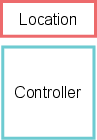
This small Protege X place contains a single controller within one location. This is equivalent to a standard Protege WX system.
Bank with Multiple Branches
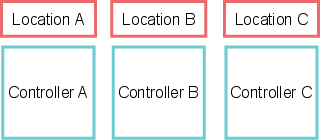
Each branch is a location with a single controller. Users might have access to doors and other records within multiple branches.
Multi-Floor Building
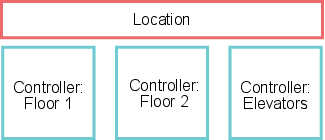
The building has one controller per floor, plus another controller to manage the elevator system. All controllers are grouped under the same location representing the whole building.
University with Multiple Campuses
Each campus in the university is a location with one or more controllers to manage each building.
Access is managed by the security and HR departments for the university as a whole, so there is no need to use location groups to set up location-based access control.

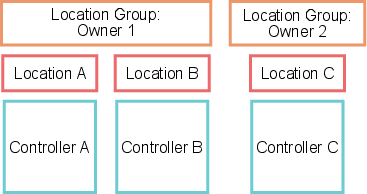
Franchises with Different Owners
Each franchise uses a single controller within a single location, as in the bank example above. Location groups represent the franchises operated by specific owners.
Location-based access control ensures that franchise owners can only see doors, areas, users and so on that belong to their own locations. Even though Owner 2 only has one location, that location must still be programmed into a location group to enable LBAC.
Global Company with Regional Offices
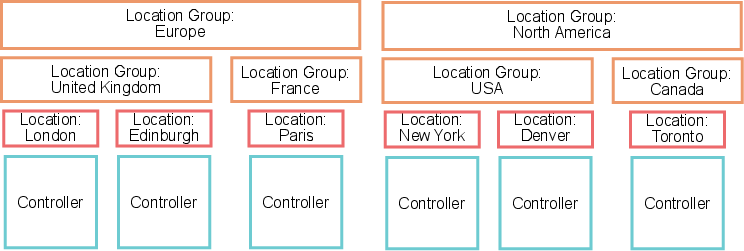
Each office is a location with one or more controllers. The locations are grouped into multiple levels of location groups by an ascending hierarchy from country to region.
Location-based access control ensures that managers can only manage users and other records within their own regions or any sub-region (e.g. a Europe manager can manage access within the UK or France, but not Canada).